 vintex.app







Repost items
Push a listing back up the platform's results by deleting and recreating it, with its settings and delays.
Why relist?
The platform ranks results by freshness: a three-week-old listing is invisible. Relisting it puts it back at the top, as if you had just put it on sale.
Do it when an item gets views but no offer, when it has been stalling for a few days, or before a weekend when traffic rises. Conversely, if you only want to fix a price or a typo, editing is the better tool: it keeps the favourites.
How to do it
In the Items table, pick Repost items above the table — the list then brings eligible items up and greys out the rest. Tick, Confirm, then set the options below: they apply to the whole selection. Items go out one by one afterwards, and the run stays readable in the Log.
What it changes on the platform
Relisting DELETES the original listing
Each listing is deleted then recreated. You lose its favourites, its views and its age; the item starts over. That is what relisting is — but it is irreversible, and an interruption partway through can leave an item deleted without its replacement. Back it up first if the listing matters.
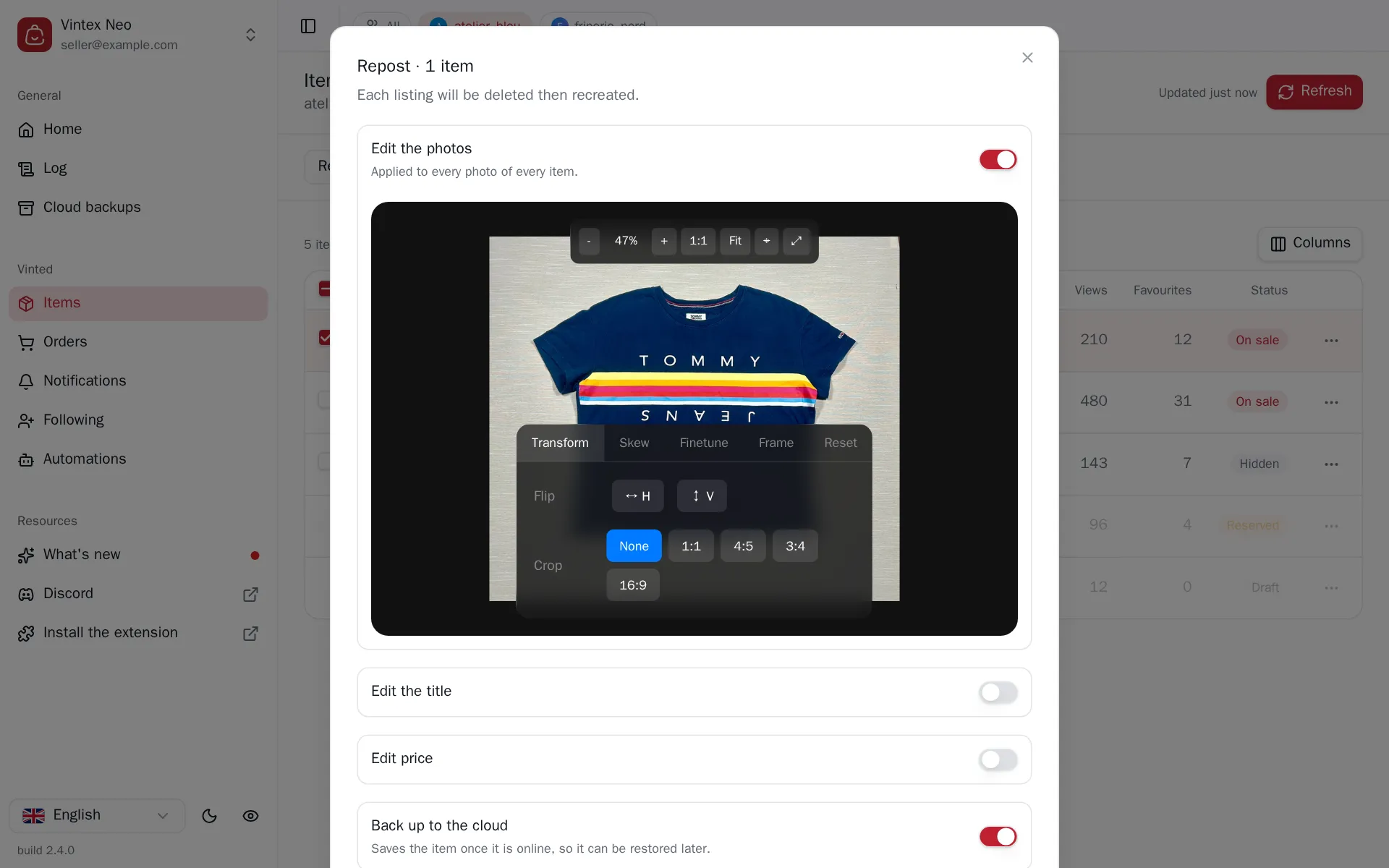
The settings
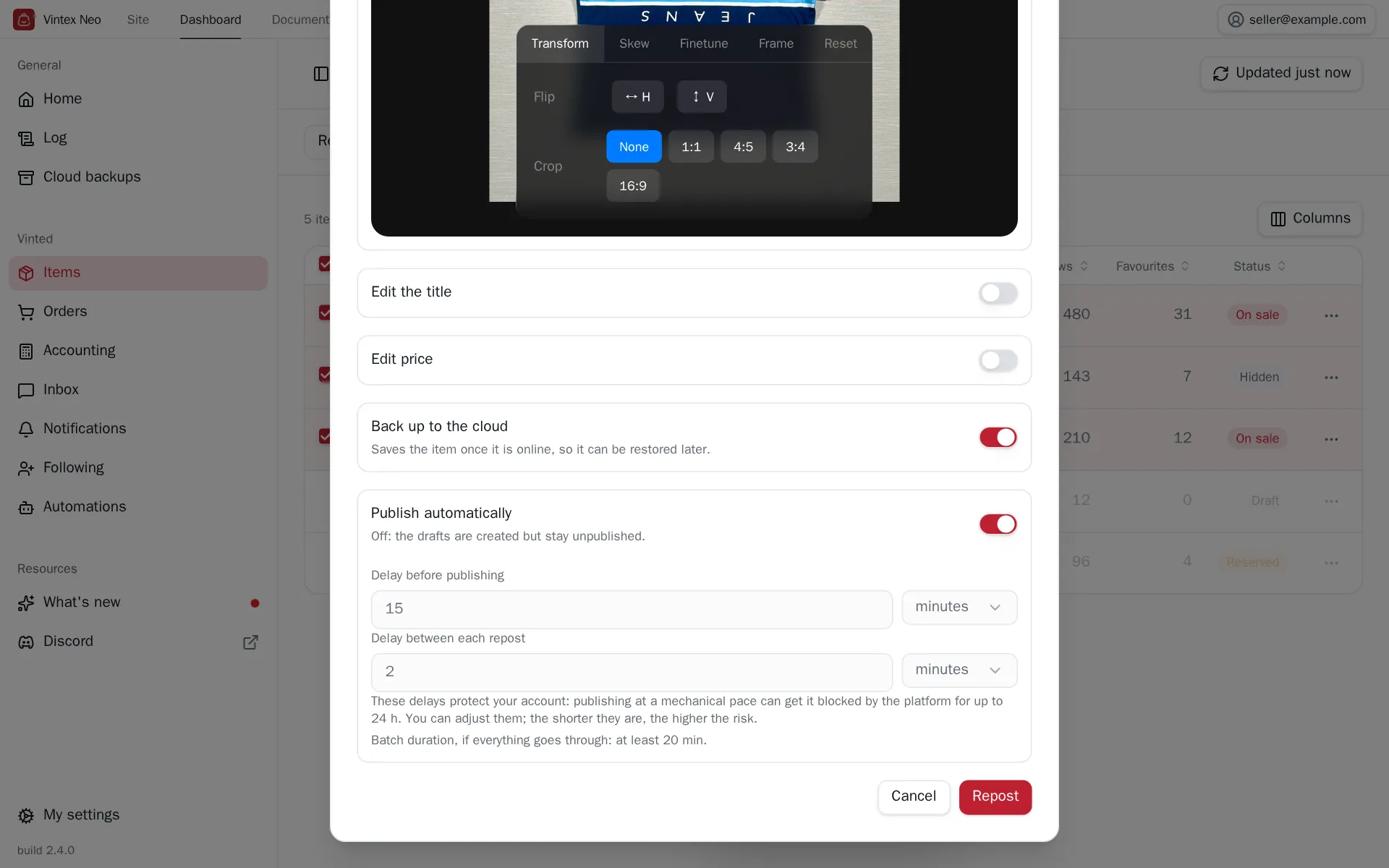
- Publish automatically — off, drafts are created but stay offline, for you to publish yourself.
- Back up to the cloud — backs the item up once online. Requires a linked profile.
- Edit the photos — crop / retouch applied to all photos of all selected items.
- Publication timing — a delay before publishing (letting the draft rest) and a delay between each relist. Below them, the dialog estimates how long the whole batch will take.
- Regenerate title & description (AI) — rewrites the listing text. Professional feature
- Edit the title — a text added before or after the existing title (no replacement: the original title is kept).
- Edit price — increase, decrease or set, by amount or percentage, with a rounding of your choice.
Relisting a sold item
It goes through its backup
The platform deletes the photos of a sold item. Without a prior cloud backup there is nothing left to relist. Items carrying the Backed up badge stay relistable after the sale.
What happens while it runs
Relisting happens in two phases, and the order matters.
First the drafts: for each item, Vintex creates the new one before deleting the old, leaving a few seconds between each. That is what guarantees an interruption mid-run never leaves you with a deleted listing and nothing in its place.
Then publishing, once the delay before publishing has elapsed. That delay is paid once for the whole batch, not per item: 30 items with a 15-minute delay is 15 minutes, not 7½ hours. The delay between each relist then separates the items that follow.
For a large batch, that second delay is the one that counts. With the default delays (15 minutes, then 2 minutes between each), 30 items take a little over an hour of pauses, and 1,400 items just over two days. The estimate in the dialog does this sum for your selection, assuming everything goes through.
The pauses are deliberate
Vintex never chains its writes to the platform without breathing, and the gap is not constant: a steady rhythm is as easy to spot as a burst. A run that looks slow is a run that doesn't get you noticed.
The delays you set above sit on top of that rhythm: they are what decides the order of magnitude, not Vintex. They protect your account: publishing at a mechanical pace can get it blocked by the platform for up to 24 hours. You can shorten them — the shorter they are, the higher the risk.
If it doesn't work
| Symptom | Likely cause | Fix |
|---|---|---|
| The cloud backup option is greyed out | seller profile not linked | Link the profile |
| The task stops midway | platform tab closed or reloaded during the run | Check the real state on the platform before retrying |
| A captcha appears | The platform is asking for a human check | See Captcha & checks |
| "Quota exhausted" | Your plan's quota is used up | See Plan & quotas |
Try it on your own shop
Vintex runs in your browser, on your own seller account.