 vintex.app







Answer an offer
Accept, decline or counter a buyer's offer, and read what they would really pay.
Why do this here?
An offer expires. Handling it on the platform means opening the app, finding the thread and scrolling to the right bubble; here the offer sits in the conversation you're already reading, with its buttons on it — and the item's price right above, which is the number you're comparing against.
How to do it
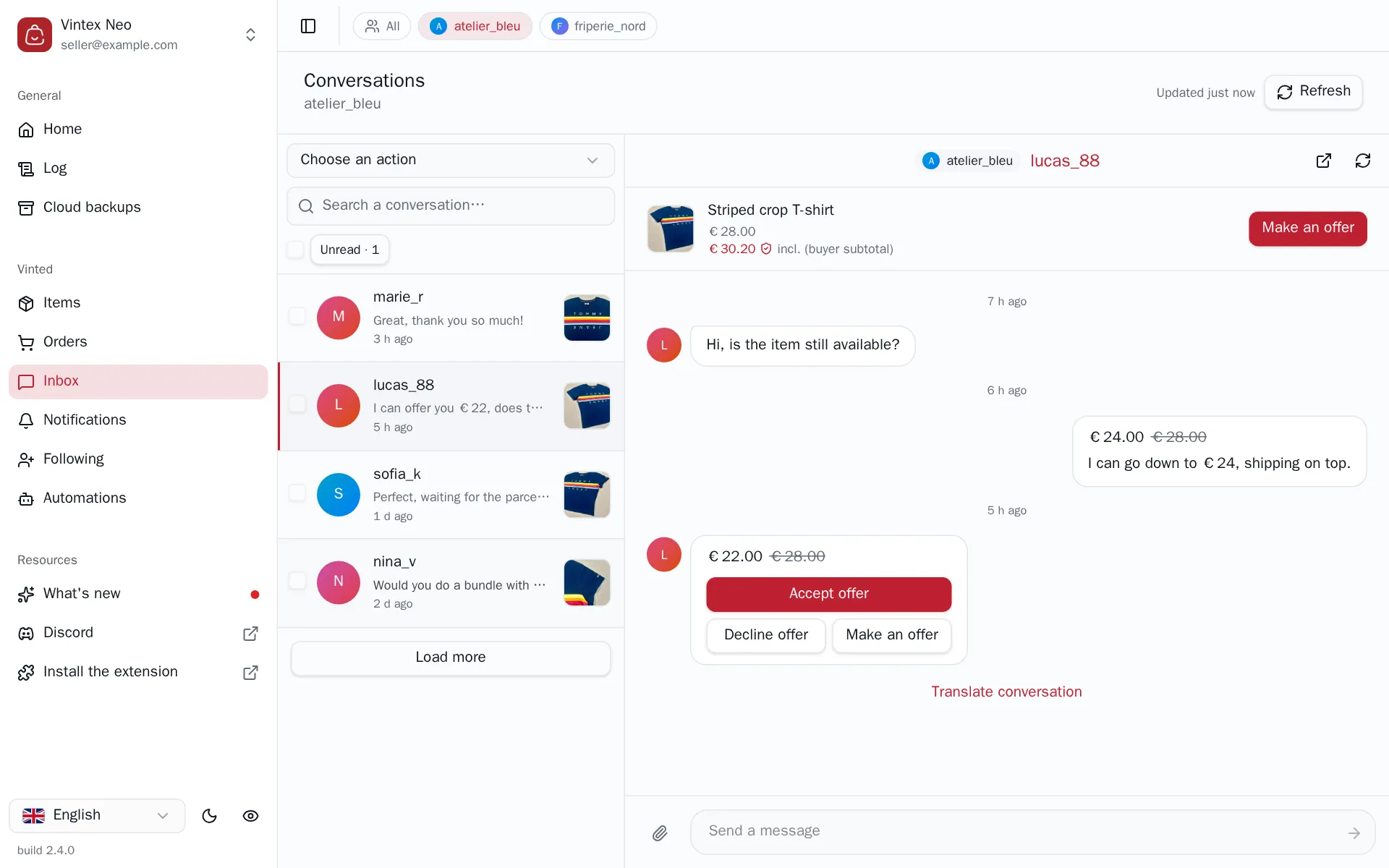
The offer you received is a bubble in the thread, showing the proposed price next to the original one. Its three buttons do exactly what they say: Accept offer closes the negotiation at that price, Decline offer turns it down, and Make an offer opens the box for a counter-offer — Vintex fills in the bounds the platform allows, so a price it would refuse can't be sent. The same Make an offer sits next to the item at the top of the thread, for when you want to move first rather than answer.
Accepting is final, and so is sending
Accepting an offer commits the sale at that price on the platform's side — there is no undo. A counter-offer, once sent, can't be withdrawn either: only a new offer supersedes it.
Two bubbles that look alike
The offer you sent and the offer you received are two different kinds of message, and the platform lays them out on opposite sides of the thread. Only the one you received carries Accept offer and Decline offer — there is nothing to accept in your own proposal. And only the current, still-pending one carries them: an offer that was already answered stays in the history without its buttons, so an old bubble can't be replayed.
What the buyer actually pays
Under the item's price the thread shows a second, higher amount, marked as the buyer subtotal. It is the price plus the platform's Buyer Protection — what the buyer sees at checkout, not what lands in your balance. It's the number they have in mind when they haggle, which is why it's worth having in front of you before you answer.
If it doesn't work
| Symptom | Likely cause | Fix |
|---|---|---|
| The offer has no buttons | It is your own offer, or it has already been answered | Only the current offer received can be answered |
| Make an offer is missing from the item card | The platform doesn't allow an offer on this order | Check the order on the platform |
| The counter-offer box refuses a price | It is outside the bounds the platform allows for this item | Stay within the range shown |
| The buttons are greyed out for a moment | An action is in flight — this is what stops it being sent twice | Wait for it to finish |
| A red triangle sits where the item's menu should be | The read of what the platform allows failed — this is not "the platform offers nothing" | Refresh the thread |
Try it on your own shop
Vintex runs in your browser, on your own seller account.