 vintex.app







Favourites boost
Get favourites on your items through a member exchange — how the queue works and what it asks in return.
Why boost?
The platform promotes what people like: an item with favourites climbs the results and shows up in recommendations. Boosting brings those favourites.
But read on before enabling: this isn't a counter you inflate, it is an exchange between members. Your browser also leaves favourites on other people's items, and that is what gives you access to the queue.
The principle, plainly
Your browser also leaves favourites on other people's items
While the automation runs, it adds favourites to other members' items from your the platform account. That contribution is what gives you access to the queue: your own requests enter it once you have contributed for about twenty minutes. The favourites balance — given minus received — decides your priority: a positive balance is served first, a negative one after everyone else.
Those twenty minutes count as contribution time, not wall-clock time: the wait only advances while the automation runs. Never start it, and your request never leaves. One exception: if there is nothing left to boost for anyone else, your request is released straight away — holding you back would serve no one.
If that exchange doesn't suit you, don't enable this automation. The other two don't depend on it.
How to do it
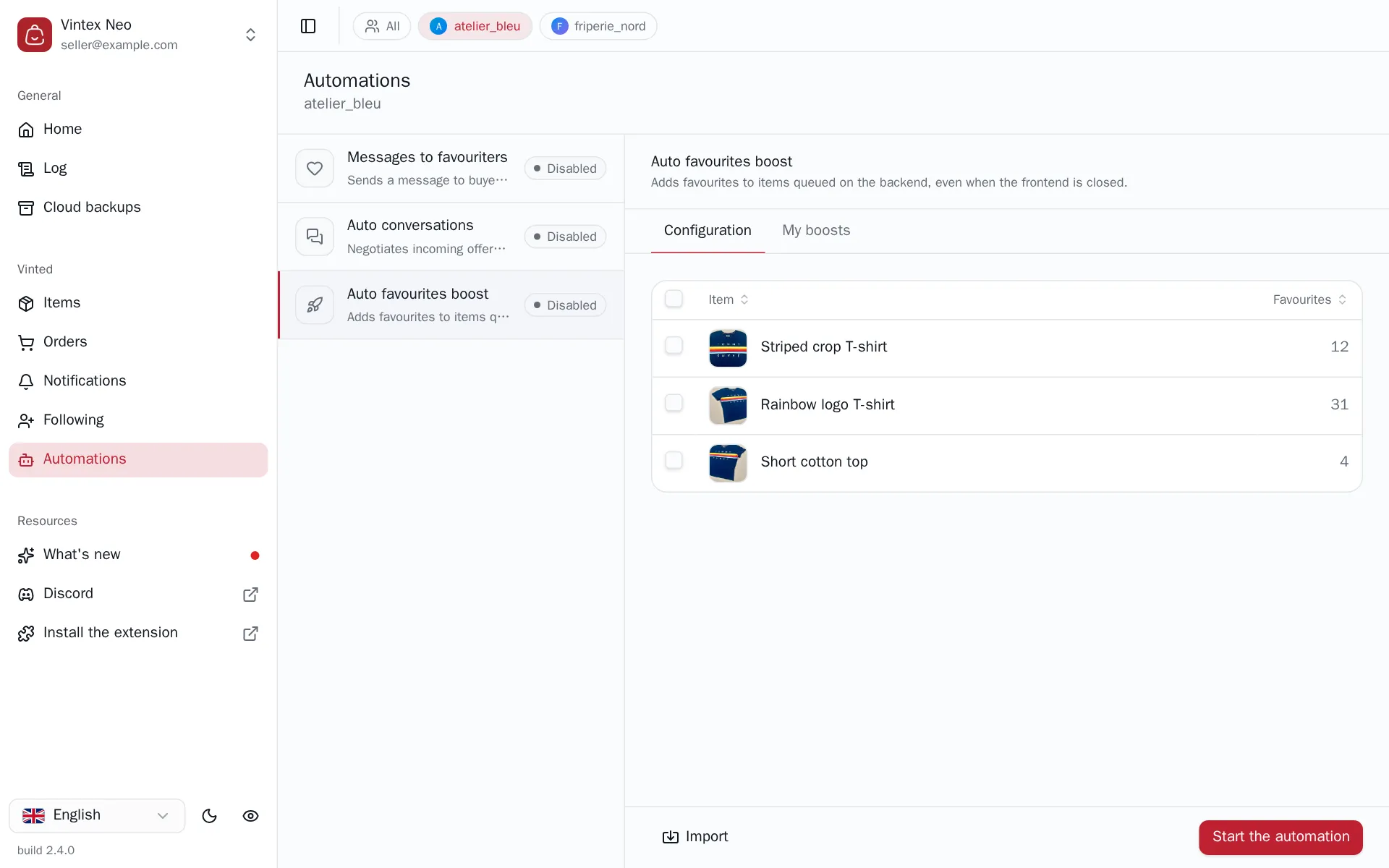
In the Configuration tab, select the items to push and set how many favourites you want per item — your plan caps that number. Only items with the On sale status are listed: sold, reserved, hidden items and drafts don't appear. Sending the request starts the automation: your browser begins contributing, and your items enter the queue.
Following a request
The My boosts tab lists your requests and their status.
| Status | What it says |
|---|---|
| Queued | Waiting to be served |
| On hold | Not eligible yet — the queue-entry time is shown |
| In progress | Favourites are coming in |
| Done | The requested count is reached |
| Item not found | The item is no longer on sale — the request cannot complete |
Two counters accompany the automation: the favourites balance and the completion rate.
What it changes on the platform
The favourites you give are visible from your account, like any favourite. And since each item you favourite can trigger a notification for its seller, the automation mutes your favourite notifications while it works.
If muting fails, you will get notifications
The message "the platform favourite notifications could not be muted" flags exactly that case: the boost carries on, but you will get one notification per contributed item.
What the queue guarantees — and what it doesn't
The queue is bounded on the Vintex side: a request is not served instantly, it waits its turn. The number of favourites you can ask for per item is capped — the dialog shows "Subscription limit: N favourites per item" once you hit yours.
Cancelling does not refund what you gave
Cancelling a request only stops the remaining deliveries. Favourites already received stay on your item, and the favourites you gave to others are not returned — your balance does not go back up.
If it doesn't work
| Symptom | Likely cause | Fix |
|---|---|---|
| "No item on sale" | No eligible item on that account | Put at least one item on sale |
| The request stays On hold | Not enough contribution yet | Let the automation run; the queue-entry time is shown |
| Item not found status | The item was sold, hidden or deleted | Request again on an item that's on sale |
| No favourites coming in | Negative favourites balance | Let it run longer to bring the balance back up |
| A flood of the platform notifications | Muting the notifications failed | Mute them manually in your platform settings |
Try it on your own shop
Vintex runs in your browser, on your own seller account.