 vintex.app







Reply to a conversation
Send a message and photos, read a thread in your language, and use the banners the platform posts in it.
Why do this here?
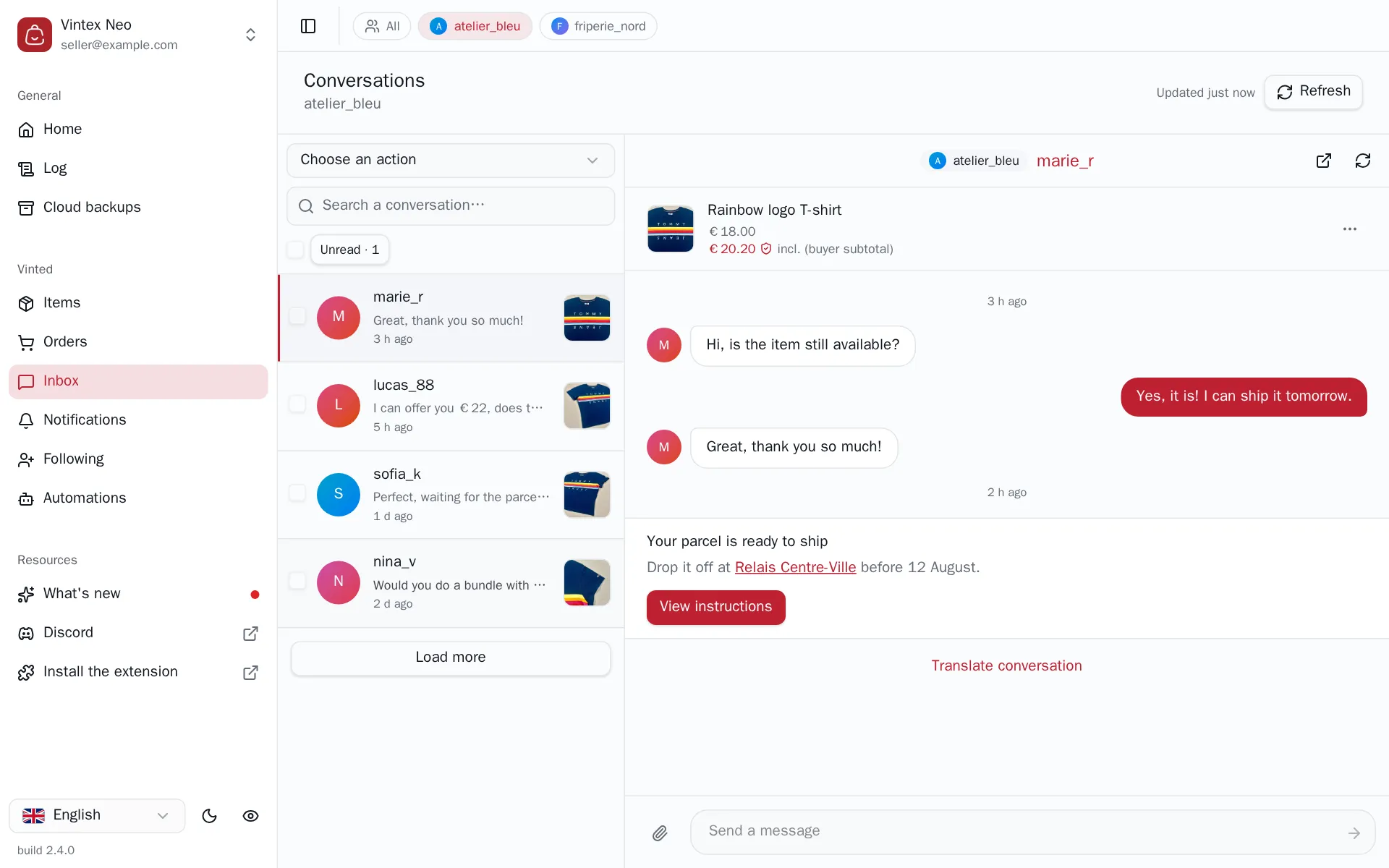
Answering three buyers on the platform means three tabs, three windows, and losing the thread between two of them. Here the list stays on the left and the thread opens on the right: you read, you answer, you move to the next one. The item, its price and what the buyer would actually pay sit at the top of the thread, so you don't have to go and check.
How to do it
Pick a conversation in the list, write in Send a message at the bottom of the thread and press Enter — or the arrow. The paperclip is Attach photos: up to five per message, and the platform refuses anything over 9 MB, which Vintex tells you before sending rather than after. The box clears only once the message is really gone, so a failed send doesn't cost you what you typed.
The platform does not allow a reply on every conversation. When it doesn't, the box is replaced by Replies unavailable for this conversation. — nothing can be done about that from Vintex.
A message can't be unsent
Once sent, a message is in the buyer's thread for good, photos included. There is no edit and no delete, on the platform no more than here.
Reading a thread in another language
Translate conversation, under the last message, swaps the whole thread for its translated version and the link becomes Show original conversation. The translation is the platform's, not ours — hence the Translated by Google mention. It changes nothing for the buyer: they keep reading what was actually written.
The banners the platform posts in a thread
Between the messages you'll find grey or framed blocks that you didn't write: shipping instructions, a delivery status, a drop-off point. They come from the platform, and the buttons they carry are the real ones — Shipping instructions opens the drop-off details, Download shipping label opens the label dialog.
A greyed-out button is not a bug. It means either that the platform no longer allows this action (the banner stays in the history once the action is done), or that Vintex doesn't handle that particular button — the tooltip says Not available in vintex — finalise on the platform, and the arrow at the top right of the thread takes you there.
A conversation has its own address
The open thread lives in the page URL, so it survives a refresh, can be bookmarked, and can be sent to someone who shares the account. That's also what the Open conversation shortcut in an order's menu uses, over in the Orders table: it lands on the right thread even when the conversation is far older than what the list has loaded.
If it doesn't work
| Symptom | Likely cause | Fix |
|---|---|---|
| The arrow stays greyed out | The message is empty, or a send is still in flight | Type something; wait for the previous one |
| A photo is refused | Over 9 MB, more than five, or not an image | Vintex says which; resize or drop one |
| The thread stays empty on the right | The conversation belongs to an account that isn't in the current scope | Switch to that account with the picker next to the title |
| A banner button does nothing but is not greyed | It opens a dialog that's still loading | Wait a moment; Refresh the thread |
| The whole thread shows an error instead of messages | The read from the platform failed | Refresh the thread with the arrows at its top right |
Try it on your own shop
Vintex runs in your browser, on your own seller account.