 vintex.app







The Accounting tab
Read what you actually earned over a period — gross, net of platform fees, and your wallet balance.
Advanced feature
What this tab is for
You come here to answer one question: how much did I earn, and over what period? It opens on the current year, because that is the grain you declare on — and each year opens onto its quarters, the grain a French micro-entreprise files on.
Everything else on the page exists to make that number trustworthy: where it comes from, what it excludes, and when it is incomplete.
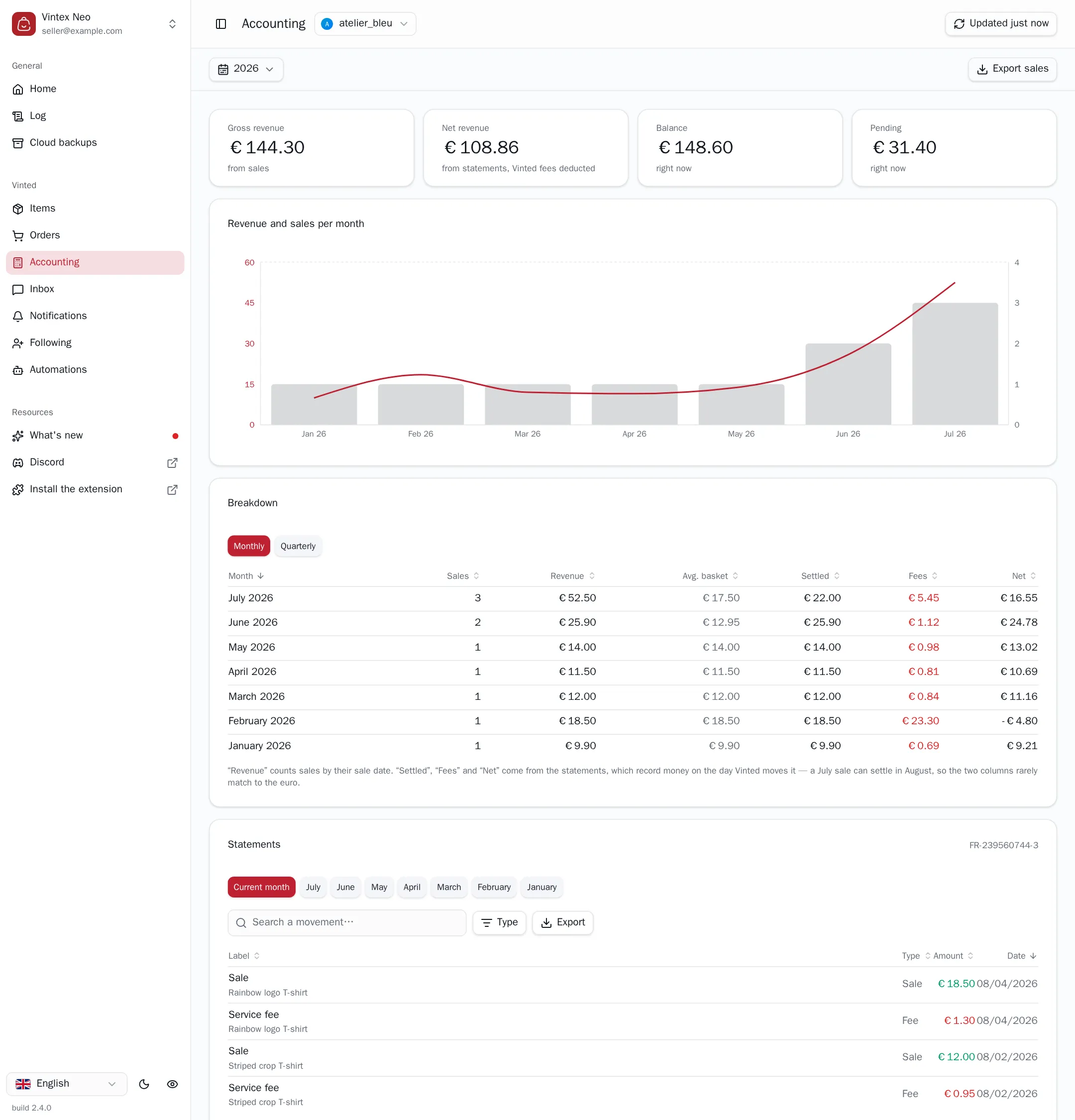
Two numbers, two sources
The two revenue figures do not come from the same place, and each says so under its value.
- Gross revenue — from sales. Counted from your sales list, on each sale's own date. It covers every seller profile in view.
- Net revenue — from statements, platform fees deducted. Read from your wallet statements, which is the only place the platform publishes what it took.
Don't subtract one from the other
The gap between them is not your fee total. The two don't count the same events on the same dates: a July sale can be settled in August, and only the statement knows when the money actually moved. The Fees column of the breakdown is the figure to read for that.
Balance and Pending are your wallet, right now — not amounts for the selected period. Their caption says so.
The breakdown
One table, two grains: Monthly or Quarterly.
Sales, Revenue and Avg. basket come from your sales. Settled, Fees and Net come from the statements. A month with no statement shows a dash, never a zero — "we have no statement" and "you paid no fees" are not the same thing, and the table refuses to confuse them. A quarter is filled only when its three months are: an understated net presented as the quarter's is the costly direction of the error.
The ledger
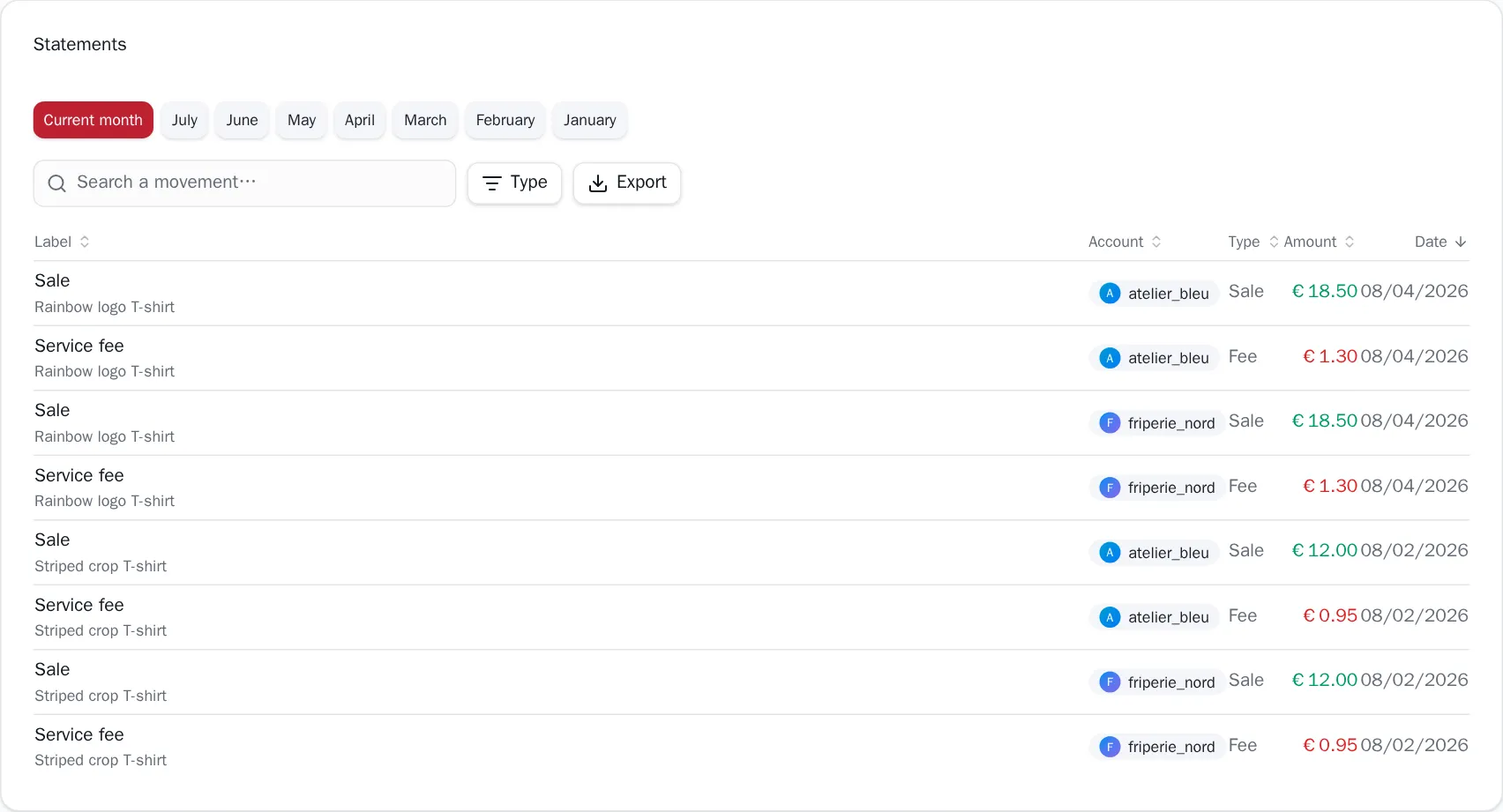
Every wallet movement of the selected month: sales in green, fees and refunds in red. Search it, filter it by Type, and export it.
With several seller profiles in view, each line carries the profile it belongs to. With a single one, that column disappears — the profile selector at the top already says it.
There is no VAT here
The platform publishes no tax data at all — no rate, no base, no amount. A VAT figure could only be computed from a scheme you declare yourself, which is a different feature from reading your statements. Showing one would mean showing an official-looking number that Vintex invented. So the tab shows none.
When the numbers are incomplete
The page says so rather than rounding the problem away. Each of these is a banner you may see:
| Banner | What it means |
|---|---|
| Partial statement | The platform returned only part of a month's movements. |
| Net revenue only covers the months the platform publishes a statement for | Some months in the period have sales but no statement, so net is lower than gross — and that gap is not a loss. |
| Several currencies in this scope | Aggregated totals mix currencies and mean nothing. Pick a single profile, or export to CSV, where currency is a column. |
| N month(s) could not be read | A statement failed to load. Those months are excluded from net revenue. Refresh to retry. |
Why the figures aren't always to the second
Vintex keeps reads from the platform in memory for a few minutes to half an hour, depending on how expensive they are — without that, every visit would hammer the platform's API, exactly the kind of burst that gets an account noticed. Closed months never change, so they are read once per session.
The button at the top right says when the data was read, and clicking it forces an immediate re-read of everything on the page.
If it doesn't work
| Symptom | Likely cause | Fix |
|---|---|---|
| Net revenue shows a dash | No seller profile in view, or no confirmed wallet on it | Pick a profile; check on the platform that your payments account is confirmed |
| "Could not load statements" | The read failed — this is not "no wallet" | Click the button at the top right; if it persists, reload the platform tab |
| "This account has no confirmed platform wallet" | The platform publishes no statement for this profile | Confirm your payments account on the platform |
| "Tax verification required" | The platform is holding your statements pending a check | Complete the verification on the platform |
| Net looks too low | Some months have sales but no statement | Read the banner above the figures — the gap isn't a loss |
| Empty page | No platform tab open for that profile | Reopen a platform tab |
Try it on your own shop
Vintex runs in your browser, on your own seller account.