 vintex.app







How it works
The execution model shared by the three automations — where they run, when, and why a cycle can do nothing.
Why automate?
Three gestures come back every day and require no thought: writing to buyers who favourite an item, answering offers, pushing listings back up. Those are the ones Vintex takes on — not listing creation, not photos, not decisions.
And an automation isn't a robot running in the cloud: it is your browser acting, with your platform session. Everything else on this page follows from that.
They are Messages to favourites, Auto conversations and Favourites boost.
Where they run
In your browser, not on our servers. An automation runs from the platform tab of the account concerned.
Browser closed, automation stopped
You can close the dashboard: automations keep going. But closing the browser, or the last platform tab of the account, stops them. On a phone, locking the screen is often enough.
Shared settings, local execution
This is the distinction that surprises the most:
- The settings are attached to the seller profile and kept on the Vintex side. They follow you from machine to machine and survive a reinstall.
- Running belongs to one machine: the one that executes the profile, named on its line of the home page. Starting an automation from the dashboard starts it there and only there, and that is deliberate: two machines running the same cycle on the same account would trip over each other.
One cycle at a time per account
On a given account, automations run one after another, never in parallel. Different accounts, on the other hand, progress at the same time.
The displayed period is not a promise
A cycle can start later than planned (it waits for the previous one on the same account) or earlier (an incoming message wakes the automation, and saving settings restarts it immediately). A cycle also has a time budget: whatever it didn't process goes to the next one.
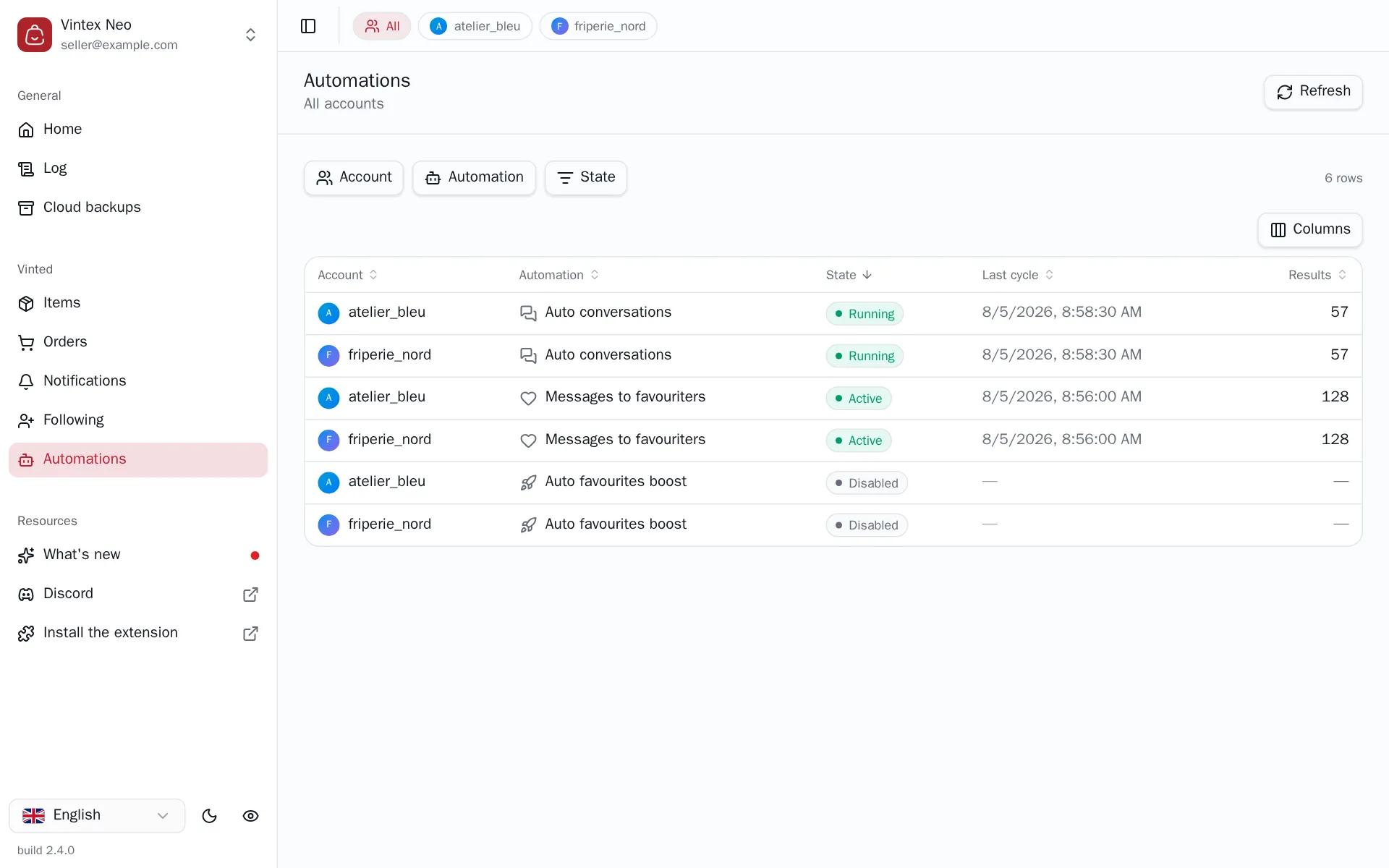
Reading the table
| Column | What it says |
|---|---|
| State | Active, Disabled, Running, Never run, Failing, Update required, Unsupported |
| Last cycle | When the last round ended |
| Results | The counter specific to the automation (messages, offers, favourites…) |
Filters by account, by automation and by state. An automation can also be started or stopped on several accounts at once, from the selection bar.
"Update required"
Each automation carries a version number. When the extension and the dashboard don't carry the same one, the configuration is frozen — rather than writing settings the other side wouldn't understand. The message says what to do: update the extension, or reload the page.
A cycle that does nothing isn't a failure
That is the most frequent case, and the Log always gives the reason: nothing new in the period, buyers already contacted, delay not elapsed, no matching rule, quota exhausted… Open it before concluding something is broken.
If it doesn't work
| Symptom | Likely cause | Fix |
|---|---|---|
| Start the automation is greyed out | Incomplete configuration — the reason is shown next to it | Complete the configuration |
| Unsupported state | The extension doesn't know this automation yet | Update the extension |
| Nothing has happened for hours | No platform tab open for that account | Reopen a platform tab |
| Error state | The last cycle failed | Open the Log, filter on Errors |
Try it on your own shop
Vintex runs in your browser, on your own seller account.