


Referral
Share your vintex link and receive 20% of what the people you invite pay for 12 months — or use a code you received to get 20% off your first payment.
Why referral?
Every vintex account has its own invitation link (vintex.app/i/…) and its own code. Someone who has
never paid for vintex and signs up with your link, or enters your code, gets 20% off their first
payment, monthly or quarterly. You receive 20% of what they pay, excluding VAT, for 12 months
from that first payment, as credit on your subscription. A member sent you their link or code? The
same page tells you how to use it: the code is the only way to get this discount, and it is entered
before the payment step, not during it.
How to do it
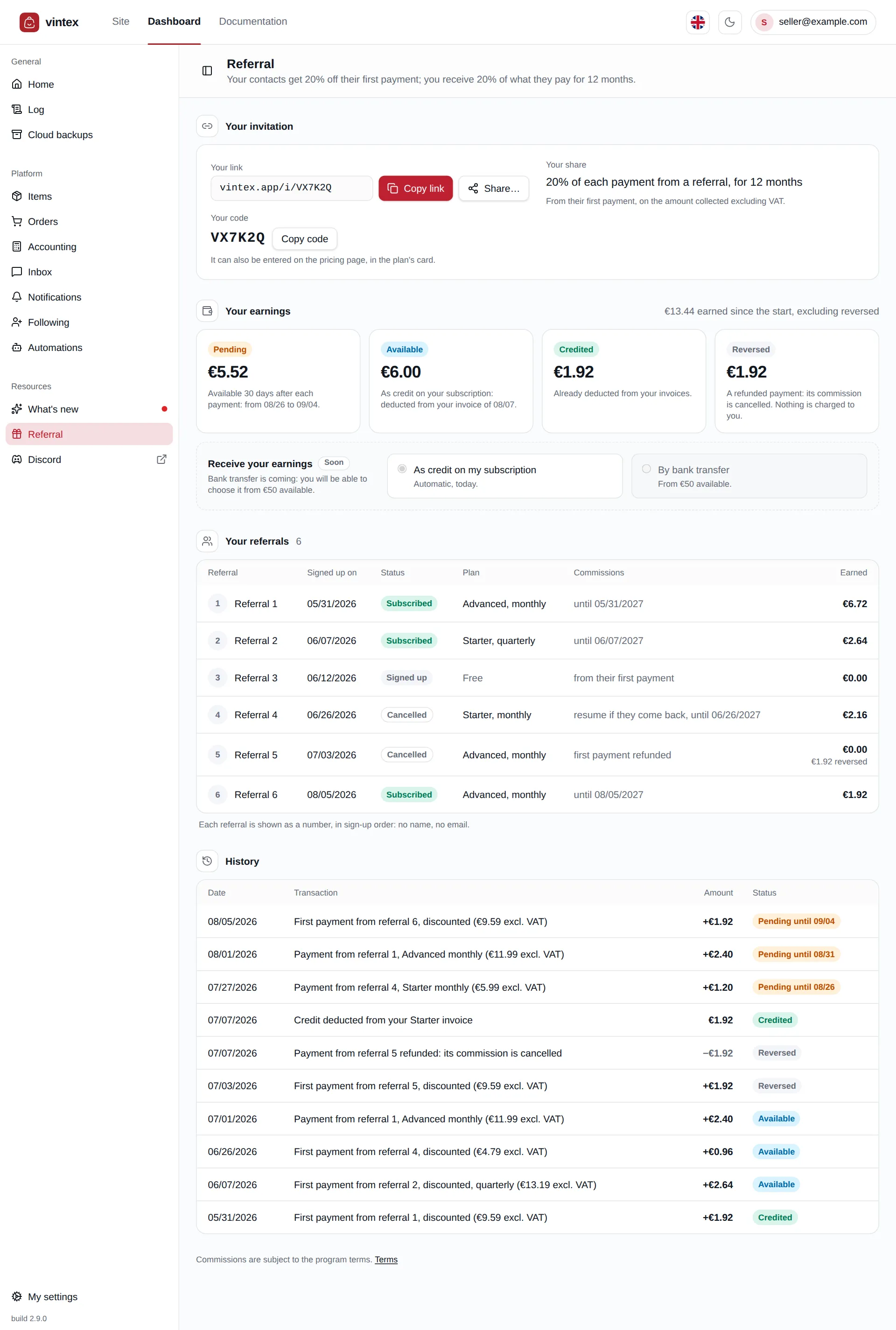
To invite someone, open Referral in the dashboard sidebar. Copy link copies your invitation link; Share… opens your device's share menu with the link alone (it only shows on devices that have one); Copy code copies the code, which can also be entered on the pricing page. Your code is generated for you and cannot be customised. Send the link to whoever you like: the people who sign up through it are attached to you when their account is created.
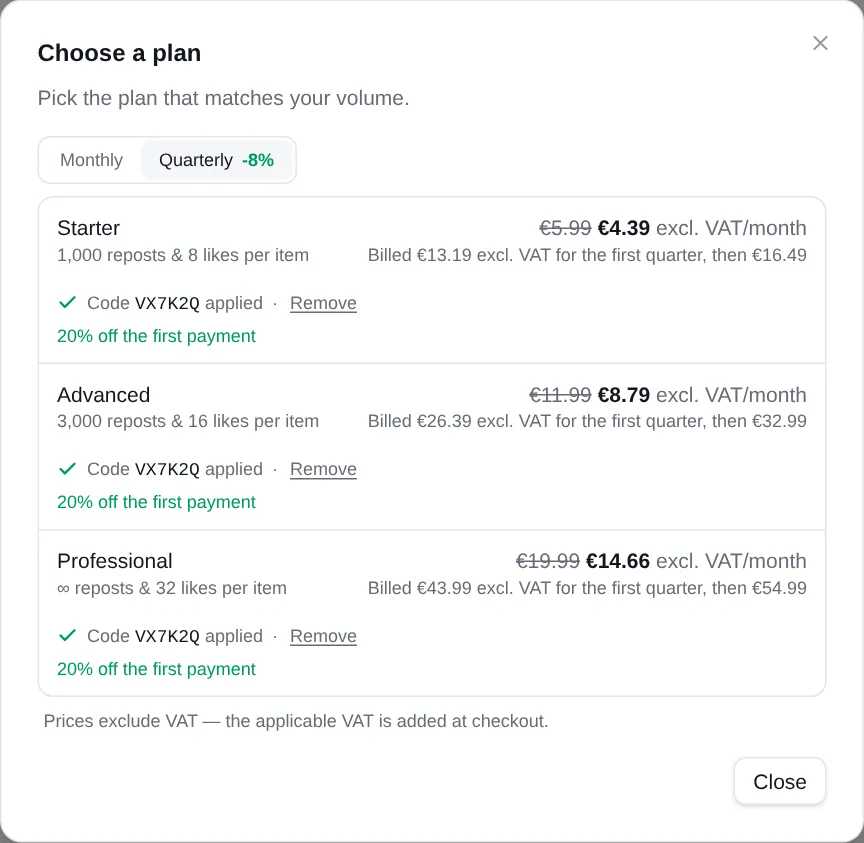
To use a code you received, from the invitation link, Create account or Continue with Google: the code follows you to sign-up, and the discount will already be applied when you choose a plan. Already have an account? Sign in from the same page: the code follows you to the pricing page. Without the link, on the pricing page or in the dashboard's Choose a plan window, click Have a referral code? under a plan, type the code, then Apply code. Once the code is accepted, every plan shows the monthly subscription price struck through, the price of your first payment and what comes next; you then pick a plan, and the discount is already applied on the payment page. Remove gives you back the regular price. A code typed but not applied is ignored when you click a plan.
An account created through an invitation link stays attached to the member who invited you. They never see your name or your email address, and you don't see theirs. Removing the discount when you pay does not change this attachment, and neither does entering another code later: your referrer's discount applies, under their code.
Your earnings
Each payment from one of your referrals creates a commission, which goes through four statuses:
- Pending: for 30 days after the payment, the time during which it can still be refunded.
- Available: placed as credit on your vintex subscription, deducted from your next invoice (the page gives its date). Without a subscription, the credit waits for your first payment.
- Credited: already deducted from one of your invoices.
- Reversed: a refunded payment, or a dispute the payer won, cancels its commission. Nothing is ever charged to you: if the commission had already been credited, it is withheld from your next earnings.
The total at the top only counts what you have kept. Payout by bank transfer is announced as Soon: for now, credit on your subscription is the only payout method. Each referral's first payment and each credit placed also appear in your activity log, under the Referral source.
Your referrals
Each referral is shown as Referral 1, Referral 2… in sign-up order: never a name, an email address or a seller profile. The table gives their status (Subscribed, Signed up, Cancelled), the plan of their last payment, and until when they earn you commissions. A referral who cancels and comes back within their 12 months earns you commissions again. A referral whose first payment was made with one of your own cards, or who had already paid for vintex, earns you none. The history lists, from newest to oldest, every payment, every reversal and every credit deducted from your invoices.
What it changes to your subscription
The discount applies once, to the first payment: the first month, or the first quarter. The following payments are at the regular price of the plan. The amounts are always shown excluding VAT; VAT is added at payment. Only one discount applies to a payment: if another offer is already applied to the account, it takes the place of the referral discount. On your side, your commissions are deducted from your own invoices; they never change your plan.
Who can use it
- Anyone who has never paid for vintex (no paid invoice above €0). A former subscriber, or a current one, can no longer get the discount.
- Your own code is refused: your account has its own link, to share with the people around you.
- The program rules are in the terms of use.
If it doesn't work
| Symptom | Likely cause | Fix |
|---|---|---|
| "This code does not exist." | Typo, or a code that has changed | Check it with the person who gave it to you; letters and digits only |
| "This is your own code…" | The code belongs to your account, or to an account with the same email address | Ask for the code of the person who invited you |
| "The discount is for a first payment only…" | Your account has already paid for vintex | The discount is not available to you; the regular price applies |
| "We couldn't check this code. Try again in a moment." | The check did not get through (network, service) — it is not a refusal | Try again with Apply code a little later |
| "This invitation does not exist." on the link | The link is wrong, or the code no longer exists | Check the link with the person who sent it to you, or create your account without an invitation |
| "Your referral space could not be loaded…" on the Referral page | The service did not answer — your link, referrals and earnings are not lost | Click Retry |
| No Share… button | Your browser has no share menu (Chrome on Linux, Firefox on a computer) | Use Copy link, then paste it wherever you like |
| A referral who paid shows no earnings | Their payment is still Pending (30 days), or they cannot earn you commissions (own card, former customer) | Check the referral's line in the table and the history |