 vintex.app







The Inbox tab
Read the conversations of every linked account in one list, find one, and clear a backlog in bulk.
What this tab is for
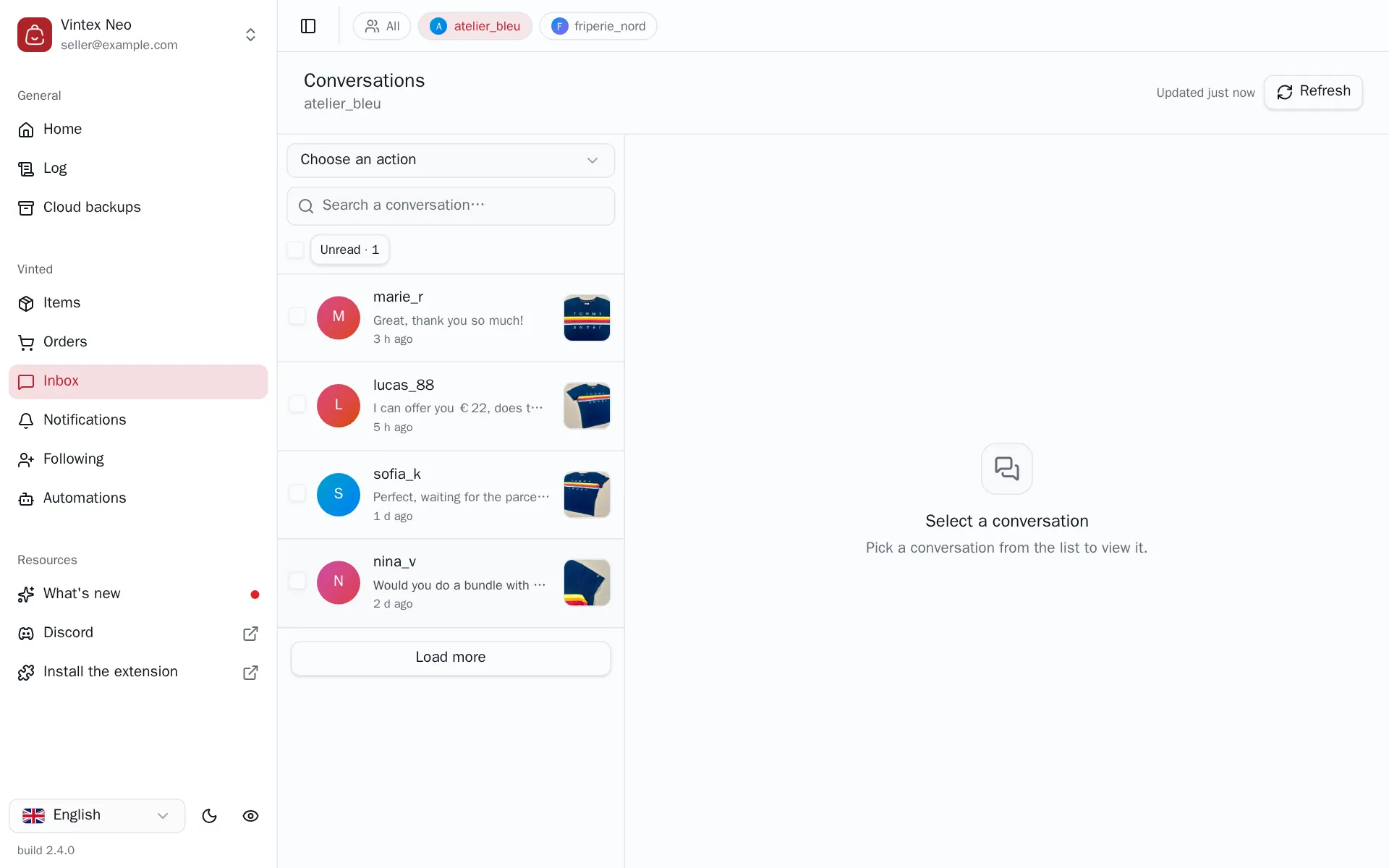
Buyers ask a question, haggle, chase a parcel — and on the platform each of those sits in its own thread, on one account at a time. This tab gathers the conversations of every account you linked into a single list, newest first, so a morning of replies is one screen instead of a dozen.
Two things start from here and exist nowhere else in Vintex: the offers you accept or counter, and the order actions — cancelling a sale, asking for more time to ship.
Finding a conversation
Type in the search box to filter on the member's name or the last message, or press Unread to keep only what you haven't opened. The list loads in pages: Load more fetches the next batch and stays available as long as one account still has some. The platform never says where the list ends, so the button stays up for one click past it — that last click adds nothing and then the button goes away.
Search only looks at what's already loaded
The platform's inbox offers no server-side search — Vintex can only filter the conversations it has fetched. So a thread further down than what you loaded comes back as no result, which reads exactly like "this conversation doesn't exist". When that happens the message says how many conversations were searched and points at Load more; press it and search again. The same goes for Unread.
Handling several at once
Pick Choose an action above the list, tick the conversations, confirm. Mark as read clears the unread badge on the ones you've already dealt with elsewhere, and Delete conversations removes them. Select all ticks everything currently listed — that is, everything the search and filters leave visible, not everything the account has.
Deleting is final
A deleted conversation goes for good, on the platform too, with its whole history. Vintex asks for confirmation and nothing more: there is no restore.
It also un-ticks the favourite in Notifications
The platform never says whether you already answered a favourite — Vintex works it out from your conversations. So deleting one puts the matching favourite back to Unprocessed in Notifications, where replying again would message the buyer a second time. Your Messages to favouriters automation won't: it keeps its own record of who it has already written to, and deleting a conversation doesn't erase it. The confirmation says so whenever the conversations you picked could be matched to a favourite.
Why the list isn't always to the second
Vintex keeps reads from the platform in memory for 3 minutes here — the shortest of the whole dashboard, because a new message has to show up quickly. Without it, every tab switch would hammer the platform's API, exactly the kind of burst that gets an account noticed.
Anything you do from Vintex refreshes what it invalidated. What the cache covers is change coming from elsewhere — a buyer writing while you read. The button at the top right says when the data was read ("Updated 12 min ago"); clicking it forces an immediate re-read. Note that the list does not update on its own: there is no live feed.
If it doesn't work
| Symptom | Likely cause | Fix |
|---|---|---|
| Empty list while the platform shows conversations | No platform tab open for that account | Reopen a platform tab |
| A conversation you're sure exists returns no result | It is further down than the pages loaded | Load more, then search again |
| An account shows a red banner instead of its rows | That account's read failed | Click the button at the top right; if it persists, reload its platform tab |
| A row is greyed out and its tick box refuses the click | The chosen action doesn't apply to it — Mark as read only concerns unread ones | Pick another action, or another row |
Try it on your own shop
Vintex runs in your browser, on your own seller account.