 vintex.app







Messages to favouriters
Automatically write to buyers who favourite one of your items, with day, time-slot and offer rules.
Why write to favourites?
A favourite is a buyer one step from an offer. A message within the hour — especially with a small discount — turns a share of those "maybes" into sales. Doing it by hand on twenty favourites a day isn't sustainable; that is exactly what this automation does for you.
If you'd rather proofread before sending, the same engine exists manually in Reply to favourites.
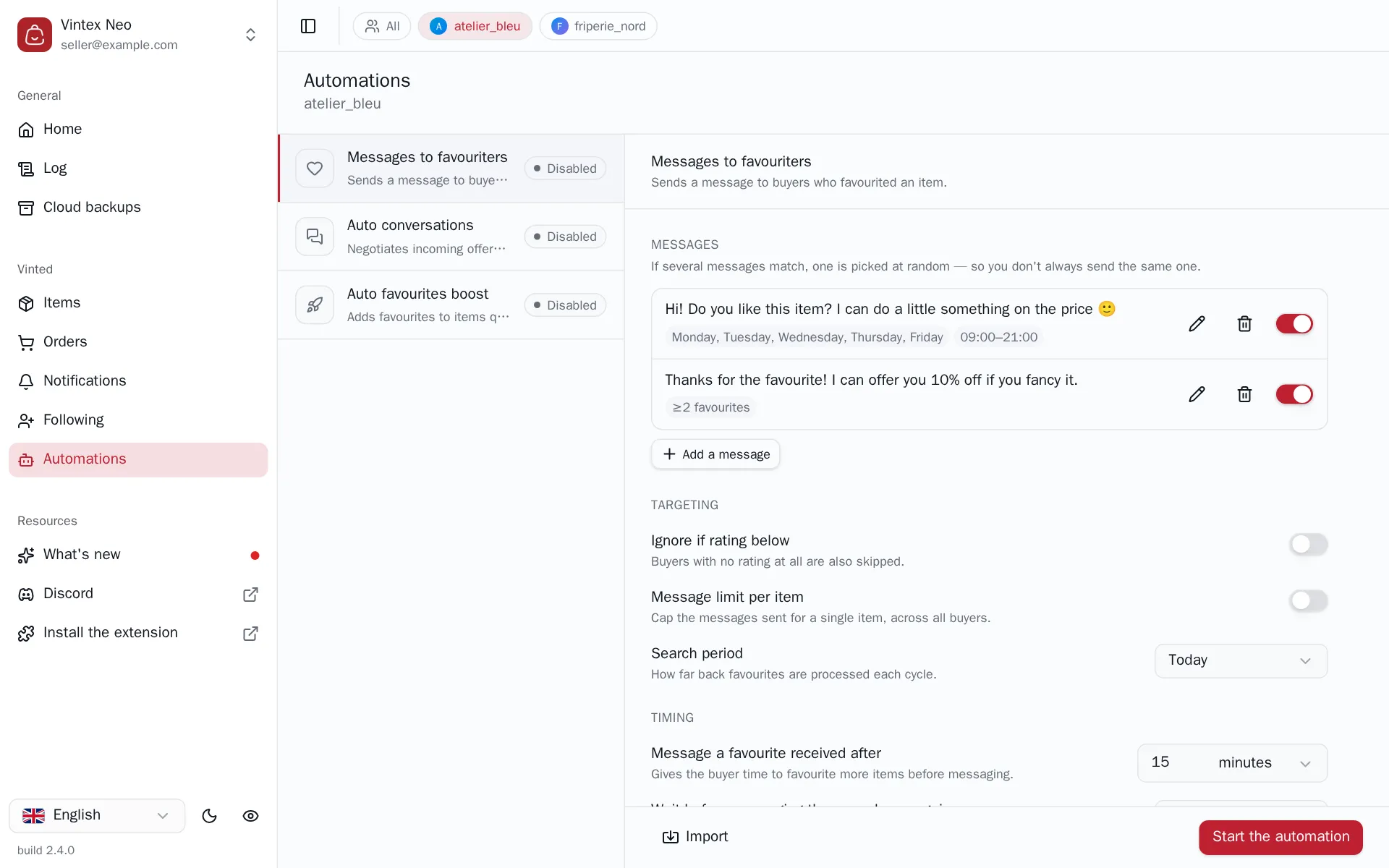
How to do it
Go to Automations, the profile concerned, then Messages to favouriters in the left pane. Write at least one message rule, set the targeting, then Start the automation.
Settings are only editable while stopped — stop, edit, restart — and they aren't sent as you type: as soon as you change something, the bottom button becomes Save changes. Once saved, it goes back to Start the automation. While it still reads “Save”, nothing has been sent yet, so you can set everything up today and start tomorrow.
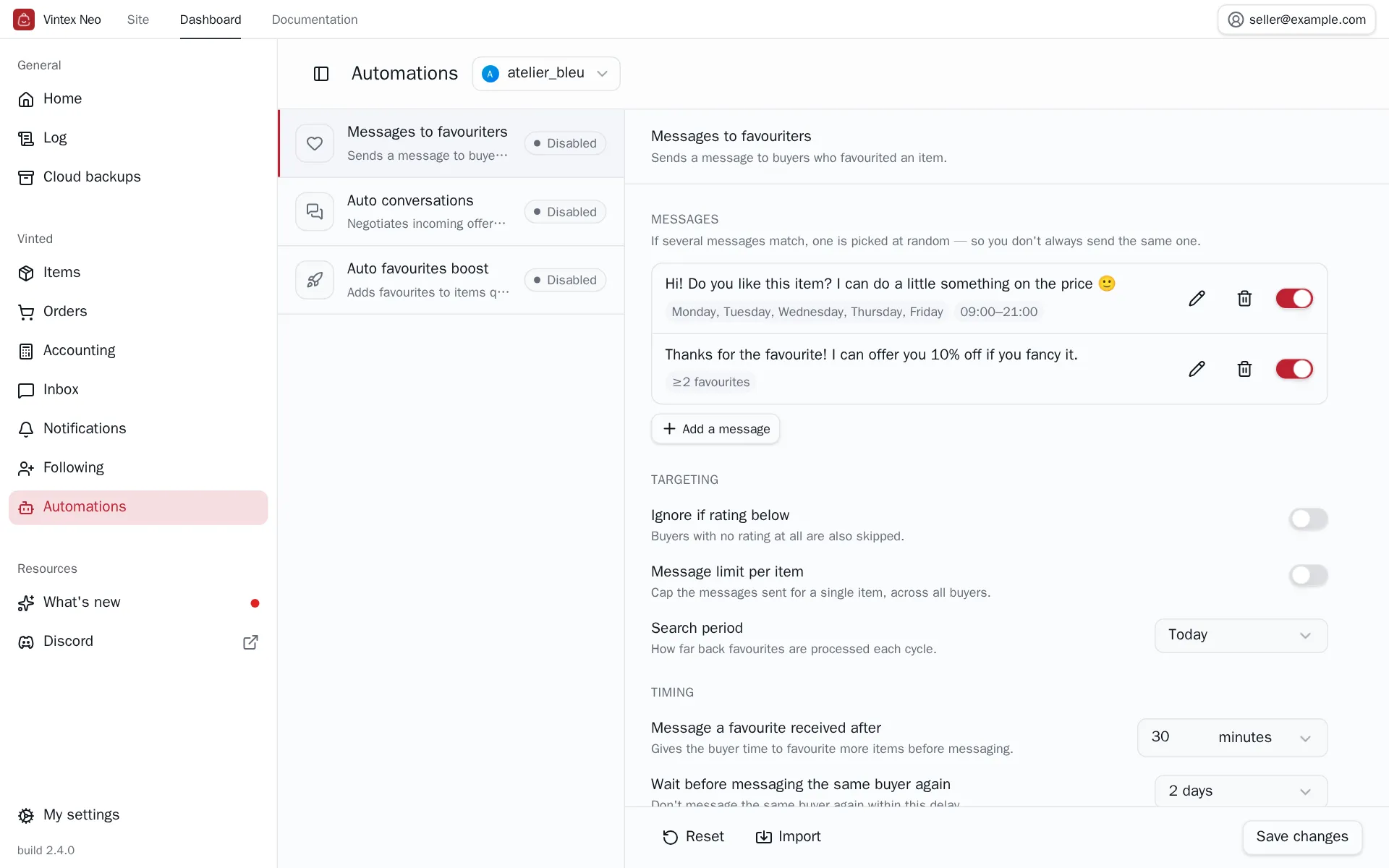
Two buttons sit at the bottom left of the panel: Reset returns every setting to its default — your message rules included — and Import copies the configuration of another profile. Both apply immediately once confirmed, without going through “Save changes”.
Message rules
The heart of the configuration. A rule carries a text, and the conditions under which it applies:
| Setting | What it does |
|---|---|
| Add a message | The text sent |
| Attach a price offer | A discount proposed with the message |
| Only if the buyer favourited ≥2 items | Reserves the rule for the keenest buyers |
| Restrict to specific days | Limits the rule to certain days of the week |
| Restrict to a time slot | Limits the rule to a time range |
Turning Add a message off while keeping an offer gives an Offer only (no message) rule: the discount goes out without any text.
On an eligible favourite, Vintex picks at random among the matching rules. There is no order and no priority: several variants of the same message simply avoid sounding robotic.
With no active rule, the cycle does nothing
It runs and ends with "no rules" in the Log. That is not a failure.
Targeting and pace
| Setting | Default | What it does |
|---|---|---|
| Search period | Today | Maximum age of the favourites processed each cycle |
| Message a favourite received after | 15 min | Gives the buyer time to add more before you write |
| Wait before messaging the same buyer again | 1 day | Don't write to the same buyer again before this delay |
| Message limit per item | Unlimited | Caps messages for one item, across all buyers |
| Ignore if rating below | No filter | Skips buyers below the threshold — and those with no rating at all |
Widening the period doesn't just 'look further'
The period drives how deep Vintex reads. On Today, a very active account may have only a handful of eligible favourites; over 7 days it reaches much further back. If your cycles do nothing, this is the first setting to check.
What it changes on the platform
Every send is a real message to a real buyer
It cannot be deleted and it is seen. A badly tuned rule — wrong slot, offer too low, cap too high — is paid for in messages actually sent. Test with a short period and a low cap before opening up.
An attached offer is a genuine price proposal on the platform: if the buyer accepts, the sale happens at that price.
Doing the same thing by hand
The Notifications tab applies the same rules to a selection you choose. Handy to catch up, or to test a rule before starting the automation.
If it doesn't work
| Symptom | Likely cause | Fix |
|---|---|---|
| Start the automation is greyed out | Your plan doesn't include this automation | Change plan from the banner shown above the settings |
| The log says "no matching rule" | The day or slot excludes all your rules | Widen days / slots |
| The log says "buyers already contacted" | They got a message within the resume window | Shorten the window if that's intended |
| The log says "favourites too recent" | The delay after the favourite hasn't elapsed | Normal — wait for the next cycle |
| The log says "incomplete deduplication" | The conversation list couldn't be read in full | Vintex refuses to send to avoid duplicates; retry later |
| Zero messages despite favourites | Search period too narrow | Switch to 2 or 7 days |
Try it on your own shop
Vintex runs in your browser, on your own seller account.